WordPress vs Wix: Which Website Builder is Right for Your Business
Having a website for your business is no longer a nice thing; it's a must. But choosing the right website builder
can be overwhelming, with so many options. WordPress started as a blogging platform and still has a ton of
features for content creation. Wix is more user-friendly but limited in blogging capabilities. This guide will
compare the two giants, Wix and WordPress, and help you decide which one is best for your business.
Overview of Website Builders
Website builders have enabled individuals and businesses to create their online presence. These platforms allow
users to design and launch a website without knowing how to code or be technical. They come with features,
templates, and tools that simplify web development.
Two of the most popular website builders are Wix and WordPress. Each suits different needs and preferences.
Wix is a cloud-based website builder known for its drag-and-drop editor and user-friendly interface. It's good
for small businesses, individuals, and anyone who wants to create a website quickly and easily. With Wix, you can
choose from hundreds of templates and customize your site to match your brand.
Wix, on the other hand, is a powerful content management system
(CMS) that offers limited flexibility and customization. It's good for bloggers, businesses, and individuals who
need advanced features and functionality. WordPress allows for thousands of customization through free WordPress
themes and plugins. It's the go-to choice for those who want to create a highly customized website. Whether you
need a simple blog or a complex e-commerce site, WordPress has the tools to build a robust online presence.
What is Wix? An Overview of the Popular Website Builder
Wix is a well-known website builder that stands out for its user-friendly interface and flexibility. It's
designed for individuals who may not be technical but want to create a professional-looking website fast and
easily. With its drag-and-drop functionality, WordPress users can customize their site and choose from hundreds
of templates and design options.
Also, Wix has features like e-commerce, blogging tools, and SEO optimization, so you can build a website in no
time and make it visible online. Overall, Wix allows users to bring their online vision to life without any
coding knowledge, making it perfect for entrepreneurs, artists, and anyone who wants to have an online presence.
Start With a Domain Name How to Secure Your Business Domain
Choosing the right domain name is important for your online presence. A domain name represents your business and
is part of your brand identity. Wix makes it easy for you to buy and register your domain on their platform.
When choosing a domain name, make sure it's your brand and memorable to your customers. Optimize your online
visibility with a domain name that stands out and resonates with your audience!
Choosing a Free Wix Template Exploring Pre-Designed Templates for Your Business Website
Wix has hundreds of free templates designed for different industries and styles, so anyone can create a
professional-looking website. Whether you have a cozy restaurant, a trendy boutique or an innovative tech
startup, there's a template designed for your business. Each pre-designed template is a solid foundation for your
site; you can customize the elements to match your brand identity. This flexibility means you don't need advanced
skills or technical knowledge to create an amazing online presence. With Wix, you can showcase your products,
services, or ideas and have a great user experience.
Customizing Your Wix Site How to Personalize Your Wix Website for Success
Once you've chosen a template, it's time to make it yours. Wix's drag-and-drop editor allows you to customize
every aspect of your site, from layout and structure to color schemes and typography. You can move elements
around, add new sections, and add unique features like galleries, contact forms, and social media links. This
level of customization ensures your website matches your brand identity and allows you to have a user experience
that resonates with your audience. Customizing every detail allows you to create a site that stands out and
captures your vision. However, while Wix has a lot of customization through its drag-and-drop editor, it doesn't
allow custom code for more functionality and design flexibility, which is available in WordPress.
What is WordPress? Understanding the Leading CMS Platform
WordPress is a giant when it comes to content management systems (CMS). It is known for its flexibility and
user-friendliness. It has thousands of themes and plugins that allow you to customize your website to your needs
and preferences.
This makes it suitable for businesses of all sizes, from small startups to big enterprises. Whether you want to
create a simple blog or a complex e-commerce site, WordPress has the tools to build a highly customized website
with robust functionality. Its strong community and continuous updates mean you'll have access to the latest
features and security patches, making it a safe choice for web development.
WordPress.com vs WordPress.org What's the Difference and Which Should You Choose?
Understanding the difference between WordPress.com
and WordPress.org is important to choosing the right platform for your
business. WordPress.com is a hosted service; your site is hosted on WordPress's servers, so it's easy to set up
and manage without requiring advanced technical skills. It has various plans, some of which are free but with
limitations like less storage, ads, and customization options.
On the other hand, WordPress.org is self-hosted; you have full control over your website and its resources.
With WordPress.org, you can choose your own hosting provider, access the vast library of themes and plugins, and
customize your site to your needs. With WordPress.org you need to choose your own web host to store your site,
and it's important to choose a good web host for your site's performance and technical support. But this route
requires more technical knowledge as you must handle your updates, backups, and security. Ultimately, it depends
on your technical skills, budget, and how much control you want over your site.
What is WordPress.org? Why It's the Preferred Choice for Custom Web Design
WordPress.org is known for its flexibility and control, which is why it's the top choice for custom web design
projects. This powerful platform allows businesses to create fully customized websites to their needs. With
thousands of plugins and themes to choose from, you can enhance functionality and design to match your brand.
This level of customization is especially useful for businesses with specific requirements that go beyond a
simple static site. You can scale and add advanced features like e-commerce, membership systems, and more. Plus,
the active community around WordPress.org provides ongoing support and resources so you can always improve and
adapt your site as your needs change.
Pricing and Cost
The cost of using a website builder can vary significantly depending on the platform, features, and services you
require. Here's a detailed comparison of the pricing plans offered by Wix and WordPress to help you make an
informed decision.
Website Builder Pricing Comparison
Platform Plan Price Features
| Plan |
Price |
Features |
| Wix Free - |
$0 - |
Limited features, Wix ads |
| Wix Combo - |
$17/month - |
Custom domain, 2GB storage, 30 minutes video |
| Wix Unlimited - |
$22/month - |
Custom domain, unlimited storage, 1 hour video |
| Wix eCommerce - |
$25/month - |
Custom domain, unlimited storage, online store |
| WordPress Free - |
$0 - |
Limited features, WordPress ads |
| WordPress Personal - |
$4/month - |
Custom domain, 6GB storage, basic features |
| WordPress Premium - |
$8/month - |
Custom domain, 13GB storage, advanced features |
| WordPress Business - |
$25/month - |
Custom domain, unlimited storage, advanced features |
Note: Prices may vary depending on the country and currency.
Wix has various plans to fit different needs, from a free plan with basic features to more advanced plans with
custom domains and e-commerce. WordPress also has plans, from free to business plans with modern features and
unlimited storage. When choosing a plan, consider your budget, the features you need, and how you plan to grow
your site over time.
Wix vs WordPress Key Comparisons for Small Business Website Owners
When choosing between Wix and WordPress, several factors come into play that can make a big difference. Wix is
known for its user-friendly drag-and-drop interface, so it's perfect for beginners or those who want to create a
website quickly without coding knowledge.
On the other hand, WordPress offers more flexibility and customization options so you can create more complex and
feature-rich websites. Each platform has its own strengths that fit different business needs, whether you
prioritize ease of use or advanced functionality and scalability for future growth. WordPress site owners get
more flexibility, control over SEO through metadata and plugins, security through ongoing updates, and options to
speed up mobile page loading. You need to evaluate your needs and goals before you decide.
Customizing Your Web Design Flexibility and Options with Both Platforms
Wix editor has a simple interface that is perfect for beginners who want to create their own site. With its
drag-and-drop feature, designing is a breeze; no technical skills or coding knowledge are required. Users can
focus on being creative instead of getting bogged down by complicated processes. WordPress has more flexibility
and many customization options, so it's perfect for businesses that want full design control.
But this level of customization comes with a learning curve. Users need to invest time and effort to master the
platform. For those willing to navigate this complexity, WordPress can give you a highly personalized and
functional website.
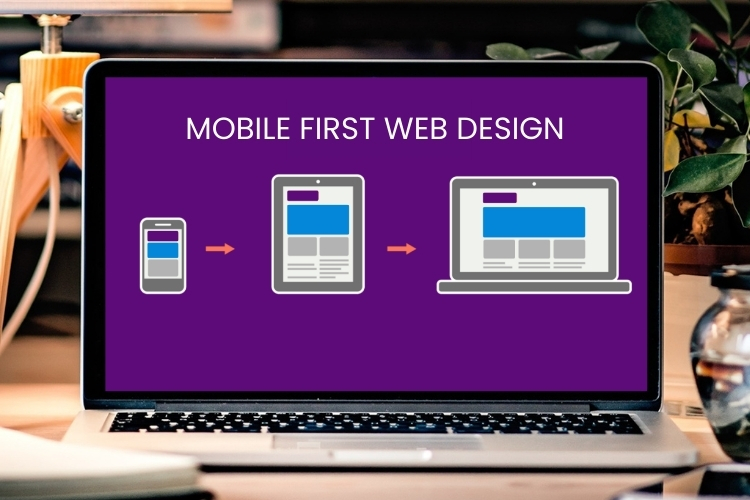
Creating an Intuitive Mobile Website: How Wix and WordPress Handle Mobile Responsiveness
In this digital age, having a mobile website is non-negotiable. More users access the internet through their
mobile devices. A well-optimized mobile site not only improves user experience but also affects search engine
rankings. Wix optimizes your site for mobile devices so you get a seamless experience across all screens, from
smartphones to tablets.
This means you can focus on creating great content without worrying if your site will look good on smaller
screens. WordPress has robust mobile responsiveness through plugins and most WordPress themes so you can
customize the mobile experience to fit your business needs. With these tools, you can create an engaging and
accessible site for all users, regardless of the device they use.
Ensuring AODA Compliance Make Your Website Accessible to Everyone
Accessibility is key to reaching a wider audience and complying with various regulations to provide equal access
to information for all users, including those with disabilities. Both Wix and WordPress recognize this and offer
various tools and resources to help you build an accessible site.
Wix has several built-in accessibility features that make it easy, such as screen reader support, keyboard
navigation, and alt text on images. These features help users with different needs to navigate your site easily.
WordPress has a rich ecosystem of plugins that can enhance accessibility and make your site
AODA-compliant.
These plugins include tools to create accessible forms, optimize content for screen readers, and ensure color
contrast. By prioritizing accessibility on your site, you comply with regulations and create an inclusive online
environment for all your website visitors.
Web Security and Updates: Why Taking Control of Your Site's Security Matters
Security is a big concern for business websites, as any vulnerability can lead to big risks, including data
breaches and loss of customer trust. Wix sites simplify this process by managing security updates for you so you
can focus on growing your business while having peace of mind with minimal effort. Their automated updates ensure
your site is always protected against the latest threats without you needing to know how.
Wix, on the other hand, puts the responsibility of security management on the user, so you need to do security
updates manually. This may seem overwhelming, but it also means you have more control over your site's security.
With WordPress, you can customize your security protocols to fit your needs and choose from a plethora of plugins
and tools to fortify your site. This gives you a more personalized approach to security so you can adapt to new
threats as they come and keep your site safe and secure.
Retaining Control Over Your Content Avoiding Vendor Lock-In With WordPress
Keeping ownership of your content is crucial for any business or individual to have an online presence. While Wix
offers an all-in-one solution to simplify website creation and management, it can lead to vendor lock-in. This
means you lose control of your site's future as you depend on their platform and features, which may not evolve
with your needs over time.
On the other hand, WordPress is an open-source platform that allows users to move their sites and content without
restrictions. This is important because it lets you adapt to changing situations, scale your site as your
business grows, and keep full ownership of your valuable content in the long run. With WordPress, you can choose
your web hosting provider, customize your site extensively, and ensure your digital presence matches your brand.
Wix vs WordPress for blogging
Blogs are websites optimized for regular and fresh content, which is why they're a popular choice for sharing
information, ideas, and personal stories. Starting a blog from scratch can be overwhelming because of the
technical skills required and the need for good content, but using user-friendly platforms like WordPress and Wix
makes it easier.
These platforms offer various templates, tools, and features that allow aspiring bloggers to create beautiful and
functional websites without needing to know how to code. But the question remains: How do bloggers choose the
best blogging tool for their needs? This is influenced by several factors, including the blogger's technical
skills, the type of content they will create, the budget, and the level of customization they want. In the end,
the right choice depends on individual needs and goals, so it is a better fit for each unique blogging journey.
Website loading speeds: Are Wix or WordPress websites faster?
We know this might ruffle some feathers, as it usually does when we talk about performance metrics that affect
user experience. We ask many questions to better understand our audience's needs and preferences. Since we
recently did a load time survey on our website, we thought it's a good time to tackle this to improve our
service. Page speed is important in many ways.
Our attention span has shrunk to almost zero in today's fast-paced digital world. Studies show that 52% of web
users abandon a website after just 3 seconds of waiting, which means businesses only have a few seconds to
improve their service. Beyond just reducing load times, it's important to note that search engines like Google
favor faster pages in their algorithm. This means improving load speed enhances user experience and can impact a
website's visibility and success in search engine results and, ultimately, traffic and conversions.
Creating an eCommerce site on WordPress and Wix
You may also need specialized features for your website if you're venturing into eCommerce. This is where
choosing the right platform matters. Here's a comparison of Wix and WordPress for creating eCommerce sites,
looking at ease of use, customization options, and features to help you decide.
Ease of Use:
Wix is a drag-and-drop website builder that's very user-friendly, even for beginners. With its simple interface
and visual editor, you can customize your website without any coding or web design knowledge. WordPress is a
content management system (CMS) that requires some technical skills as it needs manual installation and setup.
However, once installed, WordPress offers more flexibility in terms of design and functionality.
Customization Options:
Wix has hundreds of pre-designed templates and plugins to choose from. You can also use their advanced editor to
create a custom design for your eCommerce store. WordPress has thousands of free and premium themes to choose
from and a vast library of plugins to add more features and functionality to your website.
SEO Capabilities:
When it comes to SEO (search engine optimization) both Wix and WordPress have their strengths. Wix has built-in
SEO tools and features like meta tags and alt text for images but may have advanced customization and
optimization limitations. WordPress has a wide range of SEO plugins that can boost your website's ranking
potential.
Design Options:
Wix offers pre-designed templates, so users can create a beautiful website without any design skills. WordPress
has a huge library of themes and templates and more customizable options for those with design experience or
specific design preferences.
E-commerce Features:
Both Wix and WordPress have eCommerce capabilities, users can easily set up an online store and sell products.
However, Wix eCommerce site is more user-friendly and requires less technical knowledge, so it's better for small
businesses or those new to online selling. WordPress eCommerce is better for larger businesses with more complex
needs.
Customization and Flexibility:
Wix sites have a WYSIWYG editor, so users can customize their website without any coding knowledge. It also has
Wix Code feature that allows advanced customization and functionality for tech-savvy users. WordPress has
complete control and flexibility over every aspect of your website, which is open source. This is why it's
popular for developers and those who need highly customizable websites.
Features and Customization
Both Wix and WordPress offer a wide range of features and customization options to help users create and design
their websites. Here's a closer look at each platform's offerings.
Wix Site Features
Wix is known for its user-friendly drag-and-drop editor; you can build your site without any coding knowledge.
Here are some of the features Wix offers:
- Drag and Drop Editor: Customize your site by dragging and dropping elements.
- Range of Templates and Themes: Hundreds of professionally designed templates for various industries.
- Custom Domain: Get a custom domain to boost your brand's online presence.
- Online Store: Set up an online store with shopping cart and payment options.
- Contact Forms: Add contact forms to capture leads and engage with your audience.
- Social Media Integration: Connect your site with social media to increase engagement.
- SEO Tools: Optimize your site for search engines.
- Google Analytics Integration: Track your site's performance.
Wix also has apps and integrations to supercharge your site:
- Wix App Market: Hundreds of apps to add more features to your site.
- Wix Ascend: A suite of business tools to manage and grow your online presence.
- Wix SEO Wiz: A step-by-step guide to optimize your site for search engines.
- Wix Google Analytics: Integrate Google Analytics to track your site's traffic and performance.
These features make Wix a versatile website builder for all users, from beginners to those needing specific
features.
Why WordPress is a Better Option for Businesses Than Wix
For businesses with long-term goals and specific needs, WordPress is often the better choice because of its
customization options, user-friendly interface, and community support. This platform allows businesses to tailor
their website to their unique needs so they can engage with their target audience over time. With hundreds of
plugins and themes to choose from, WordPress has the flexibility to adapt to changing business goals and market
trends.
Benefits of Custom WordPress Sites How They Help Grow Your Business
Custom WordPress sites have scalability, flexibility, and a professional look that can boost your brand's online
presence. By choosing a custom solution, you can ensure your website grows with your business, adapting to new
challenges and opportunities as they come. With hundreds of plugins and themes to choose from, you can add
functionality and design to your website to match your evolving business needs. Whether it's adding eCommerce,
SEO optimization or unique visual elements, a custom WordPress site allows you to create an engaging user
experience that reflects your brand and goals.
What You Need to Know About Building a Custom WordPress site
Building a WordPress site requires planning and understanding of the platform to create an online presence. Start
by defining your website's purpose, is it for a blog, eCommerce store or portfolio. Get familiar with the themes
and plugins to add more functionality and design to your site. Consider your audience and how you can serve them
better. Here's what you need to know to get started.
How to Transition From Wix to WordPress A Step-by-Step Guide
Migrating from Wix to WordPress can seem overwhelming, but with a step-by-step approach, it's doable and can give
your site more flexibility and functionality. Start by exporting your content from Wix, which means saving your
images, text, and other media files so nothing gets lost during the website-building process.
Next, choose a WordPress host that fits your needs—consider speed, reliability, and customer support. Once you
have your web hosting, import your content into WordPress using the tools available which can help streamline the
process. Once your content is in, take your time to customize your new site, adjust themes, layouts, and plugins
to match your brand standards, and create an engaging user experience. This migration will give you more
functionality for your site and open up more opportunities for future growth and development.
Why Upgrade to a Custom WordPress Website? Boost Your Business Online
Upgrading to a custom WordPress site can boost your online presence and give your visitors a more tailored
experience. A custom site has more flexibility to implement advanced functions on eCommerce, personalized content
and seamless integrations with third-party tools that cater to your audience's needs. This level of customization
will improve user experience and brand identity. Ultimately, this will lead to more engagement, higher retention
rates, and more growth for your business and make you stand out in a crowded digital space.
When to Hire a Web Design Company Key Signs It's Time to Bring in the Pros
Sometimes it's good to hire professionals for your website project. Hiring a reputable web design company can
make all the difference if your business needs advanced customizations like unique features that cater to your
specific needs, a seamless user experience that keeps visitors engaged, or eCommerce functionality that makes
transactions smooth. This way, your site is built to professional standards and optimized for performance,
security, and user accessibility. By leveraging the expertise of experienced designers and developers in Calgary,
you can create a site that meets your current needs and scales with your business as it grows.
Launching a New WordPress Website What to Expect for Your Business
Launching a new website on WordPress is a big milestone for your brand or business. To ensure a successful launch
plan, carefully consider your audience and the key messages you want to convey. Test every aspect of your site,
from functionality to user experience, to identify and fix any issues before going live. Once your site is ready,
promote it across social media, email newsletters, and online communities to reach your audience. With a
well-designed and optimized WordPress site, you can expect more visibility in search results, customer
engagement, and, ultimately, more business growth over time. This launch is not just about going live, it's about
setting the foundation of your online presence and building relationships with your visitors.
Core Web Vitals & Page Experience Why It Matters for Your WordPress Website
Core Web Vitals are the metrics for a great user experience on the web. These vital indicators focus on loading
performance, interactivity, and visual stability. Loading performance measures how fast the main content of a
page is visible to the user so they don't have to wait too long. Interactivity measures how responsive a page is
when users interact with it, which is important for engagement. Visual stability measures how much the layout
shifts during loading so users don't accidentally click on the wrong element. By optimizing these critical areas,
WordPress sites can not only rank better in search results but also give visitors a smooth and enjoyable browsing
experience that keeps them longer and allows them to explore more.
Privacy Overview Understanding Website Privacy Policies and User Data Protection
User data is non-negotiable in today's digital world. Both Wix and WordPress have tools and features to help you
create and implement your own privacy policies that fit your needs and comply with
regulations like GDPR and CCPA. By doing so, you not
only protect your users but also build trust and loyalty with your audience. Plus, by having robust security
measures like SSL certificates, regular software updates, and strong password protocols, you'll increase your
site's credibility and protect against data breaches. This overall approach to privacy and security is key to
having a trustworthy online presence.
Conclusion
Choosing the right website builder is key to your business's online success and can make a big difference in how
you connect with your audience. Wix is simple and easy to use, great for those just starting out or with limited
technical skills. The drag-and-drop interface allows you to create beautiful sites without writing any code.
Plus, Wix has a range of templates and features for different industries, so new businesses can get online fast.
On the other hand, if you're looking for long-term growth and customization, WordPress is the top choice due to
its flexibility and control. With WordPress, you have thousands of themes and plugins at your disposal to tailor
your site to your needs. This is perfect for businesses that will scale their online presence or need advanced
functionality like e-commerce or membership systems.
Before you make your decision, consider your business's unique needs, future goals, and resources. Think about
your budget, the technical skills of your Calgary web designers,
and how you plan to grow your site over time. If you're ready to take your online presence to the next level,
WordPress is a powerful tool to help you achieve your business goals. It is a solid foundation for building a
professional and engaging site that will adapt to your changing needs.